Dinosaurs · A drawing idea for little artists
How to draw an apatosaurus: looping tail and a long neck
Set the position of the upper right small head first.
For iPad & iPhone · In-app purchases
These 3 pictures show selected moments from the drawing. For every step in between and a guide on your canvas, get the full lesson in LittlePaper.
What you will learn
Practice this visual check: First check the space between the tail and the four legs, and then add parallel abdominal lines along the shape of the neck and body.
Shapes and proportions
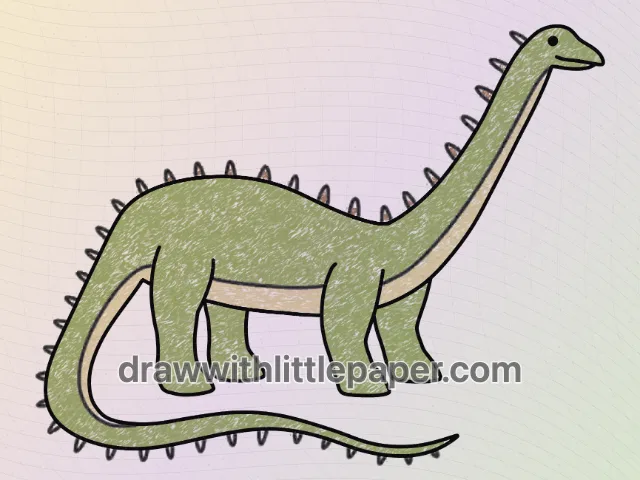
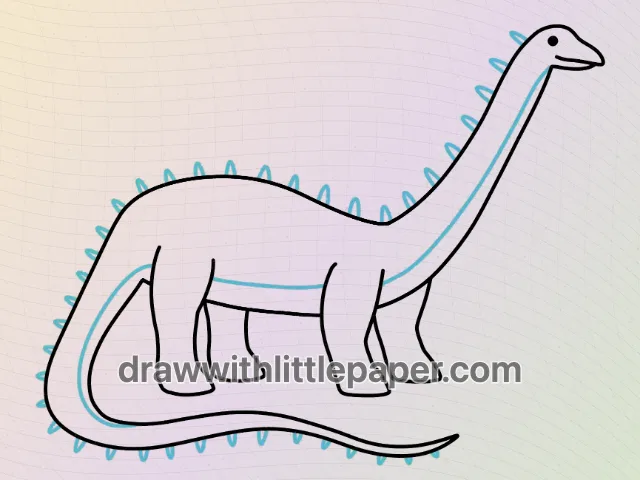
The small head on the upper right is positioned first. The oval-shaped body on the lower left side stretches upward to the right into a long neck, the tail curves back from the left end to the bottom, and the legs are divided into two groups, front and rear.
A common mistake
The long tail touches the feet when it wraps around, or the distance between the neck and abdomen becomes wider and narrower.
How to fix it
First check the space between the tail and the four legs, and then add parallel abdominal lines along the shape of the neck and body.
These three images are key-stage previews: the starting shape, the completed outline, and a new crayon color study. Follow the complete drawing sequence in LittlePaper. On paper, leave room around the first shape for the parts added later.
A few things to start with
Paper, pencil or black drawing pen, eraser, and crayons or colored pencils for color matching for this lesson.
A little peek at the drawing
1 / 3
Selected stages · The complete drawing sequence is in the app.
Shapes, character & color
A look at the drawing stages.
Try the shape tips below on paper. When you’re ready to draw along with each small step, continue in LittlePaper.
- 01Selected stage
Position the basic shape first
Set the position of the upper right small head first. Observe the position of the starting shape on the paper, leaving space for subsequent outlines and additional components.
Position the basic shape first · Preview image 1 of 3 - 02Selected stage
Connect profiles and arrange parts
The oval-shaped body on the lower left is stretched upward to the right into a long neck, the tail curves back from the left end to the bottom, and the legs are divided into two groups, front and rear. First check the space between the tail and the four legs, and then add parallel abdominal lines along the shape of the neck and body.
Connect profiles and arrange parts · Preview image 2 of 3 - 03Selected stage
Select the color of the part to complete the crayon draft
The body and legs of Apatosaurus are grass green, the neck and abdomen are light yellow, and the spines on the back are warm brown. Apply the color first with light pressure, leaving the black outline, and then compare pairs of parts using the same color.
Select the color of the part to complete the crayon draft · Preview image 3 of 3
The next little step is yours
Like the idea?
Let’s make it together.
Open the “Apatosaurus Drawing” drawing idea in LittlePaper for the complete sequence. Follow a guide, pause when you need, and add your own colors.
Download LittlePaper from the App Store, then open the drawing idea inside the app.
Every step, at your pace.
See the full drawing sequence. Pause, replay, and take another look whenever a shape needs practice.
A guide where you draw.
Trace on the canvas, then try your own lines with a finger or Apple Pencil on a compatible iPad.
Make it yours. Keep the making.
Add crayon color, replay your creation, and give your picture a home in a digital 3D book.